Create or access your player account, claim your assigned username/key, complete check-in, and keep your virtual hand on the PC once the event begins.
Approved contestants should read the rules and player guide before claiming an event key.
Create an account or sign in with the account you will use for the event. Use a private username/key only if it was sent to you by HotDropFPS.
You are signed in as:
Player
CONTESTANT ACCOUNT
Host/admin tools are hidden unless this account has protected administrator authorization.
Authorized Host Controls
ADMIN AUTHORIZED
Create Username-Key Event
Prepare your approved Twitch/Kick username list from hotdropfps.com/handson. The backend creates one private, one-time key per approved username.
Current Event
Status —Usernames 0Redeemed 0Checked In 0Active 0Round 0
Waiting for the test event to begin.
Host Preflight
Before Starting the Event
NOT READY
App Check enforcedWaiting
Backend scheduler readyWaiting
Roster lockedWaiting
At least 2 checked-in contestantsWaiting
Exports reminderDownload keys/roster/audit before and after test
This checklist is an event-day safety guard. It does not replace official rules, beta testing, or the post-event audit review.
Protected Admission
Approved Usernames + Invitation Keys
UNLOCKED
Paste approved Twitch/Kick usernames only, one per line. A leading @ is optional. The backend rejects duplicates and generates one one-time private key for each approved username.
New One-Time Username Keys
Save and privately send each username its matching key now. Keys are shown to the host and may also be retrieved by the approved username while unclaimed and before roster lock. Keys are removed after redemption or roster lock.
Before roster lock, an unclaimed private key may be reissued for the same approved username if it was exposed or lost. Unclaimed or claimed-but-not-checked-in entries may be closed with a required audit reason. These controls do not add replacement contestants.
Create an event, then add approved usernames to issue keys.
Host-Only Visual Mode
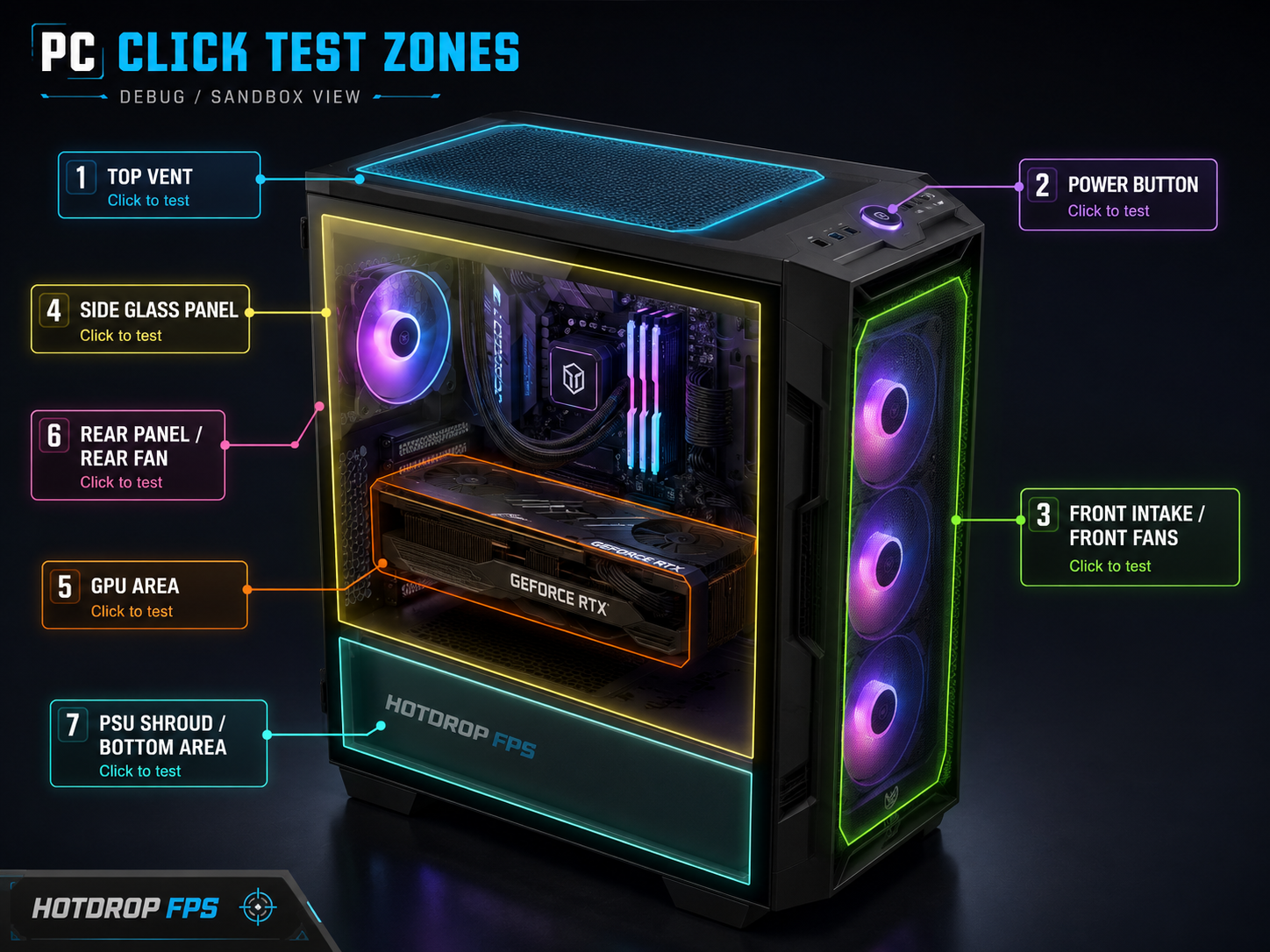
Debug / Live PC View
DEBUG
Available to authorized host accounts only. Live Mode now uses the same labeled PC model shown in Debug View so component interaction requests stay visually clear for players. The shared server-verified hotspot map never changes.
If you pause during a warning or active prompt, void that round before resuming so no player is penalized.
Host Incident Log
Record Beta / Event Issue
AUDIT NOTE
Use this for beta rehearsal issues, disputed prompts, network/check-in concerns, stream interruptions, moderation notes, or anything that should be tied to the protected audit record.
Winner Verification
Final Results Lock
WAITING
Use this only after the event reaches winner-pending or review-required status. Locking final results does not fulfill the prize by itself; it records that the event logs were reviewed and the public result may move into verification/fulfillment follow-up.
No final contestant is pending verification yet.
Contestant View
NOT JOINED
Waiting for a test lobby
A host must create an automated sandbox event before test contestants can place their hands on the PC.
Claim Your Username With Your Key
Enter the exact Twitch/Kick username approved by HotDropFPS and the matching private one-time key that was sent to you. The key binds that username to your signed-in account.
Need Your Key?
Find Assigned Key By Username
LOBBY ONLY
If HotDropFPS issued a key for your approved username and it has not been redeemed, you can reveal it here while the lobby is open. If your username is not found or the key is already redeemed, contact HotDropFPS via Discord.
This key is private. Do not share, sell or transfer it. Complete the acknowledgements below and claim it with the matching username.
Required Before Claiming
Contestant Rules + Privacy Acknowledgement
NOT COMPLETE
These acknowledgements are recorded with your key claim. Read the event rules and privacy notice before continuing.
Complete every acknowledgement to activate the key claim button.
Starting roster locked
This event is no longer accepting key redemptions or contestant replacements.
Contestant Access
Admission —
KEY REDEEMED
Your assigned username and one-time key have been claimed. Complete network-restricted check-in before the host locks the starting roster.
Local emulator only. On the deployed event portal, check-in uses backend-observed network information.
One-network check-in: Your network is detected securely when you check in. A second contestant checking in from the same detected network is denied under the event rule.
Your raw network address is not shown publicly. Staging stores a protected keyed fingerprint only for check-in collision enforcement and audit review.
Checks Passed0Lifelines0
Device Handoff
Active Gameplay Device
ACTIVATION NEEDED
Activate this device before gameplay so it can submit interaction checks and request protected breaks.
You may move play between your PC and phone using the same signed-in account. Only one device can control gameplay at a time. Switching devices never pauses or extends a presence-check deadline.
Player Controls: Use breaks only between checks. Your next required presence check appears directly below.
Healthy Play
Protected Breaks
NO ACTIVE BREAK
Breaks may be started between interaction checks once the event is live.
Emergency Break
Miss checks safely for 15 minutes.
Available once the event is live.
Long Break
Miss checks safely for 4 hours.
Available once the event is live.
Break approval, expiration, and reuse timers are server-controlled. Breaks cannot begin during an incoming or active interaction check.
Presence Check
—
No active prompt
The next presence check will arrive automatically at a randomized time.
GET READY
Presence check incoming
A prompt will open when the server warning timer ends.
Presence Check
Respond now.
Click the requested PC component in your contestant view.
DEBUG VIEW
Labeled PC component map for event interaction clarity.
PC clicks locked until a visual check is active.
Waiting for event start.
Labeled PC component map remains visible for clear component checks.